Voice agents should teach you, not just answer you.
How I turned a voice-first AI journal into a Socratic tutor that teaches through conversation, quizzes you until you get it right, and won't let you fake understanding.

I give talks for a living. DevRel means standing in front of rooms full of engineers and explaining complex technical concepts clearly enough that they walk away understanding something new. That's the job.
The problem is I retain things way better when I explain them out loud than when I read about them. Most people do. It's why rubber ducking works. It's why the best way to learn something is to teach it. The Feynman technique isn't a productivity hack. It's how human brains actually consolidate knowledge.
But rubber ducks don't talk back. They don't catch when you're wrong. They don't ask follow-up questions. They don't say "okay, now explain that without using the word 'basically.'"
So I built something that does.
The App That Needed a Teacher
I've been building Speak2Me for the past few months. It's a voice-first AI agent. You talk to it, it talks back, it remembers everything about you across sessions. Real memory, not "that sounds frustrating" generic chatbot stuff. Three-tier memory architecture: a deterministic profile summary, an immutable facts table with superseding logic, and per-exchange vector search using 3,072-dimension embeddings in TiDB.
If you want the full architecture breakdown, I wrote about that in my previous blog post. This post is about what happened after the architecture was done.
The system had grown to 12 database tables, 6 external services, 3 memory tiers, a voice pipeline through Hume EVI, and an Inngest background processing queue. I could ship features. I could fix bugs. But when it came time to prep for a conference talk and actually explain how all the pieces connect and WHY I made each decision, I couldn't hold it all in my head at once.
I could read my own code. I could read my dev log. But reading didn't make it stick. What I needed was someone to walk me through my own system and quiz me until I could explain it cold.
That didn't exist. So I built it.
Same App. Different Brain.
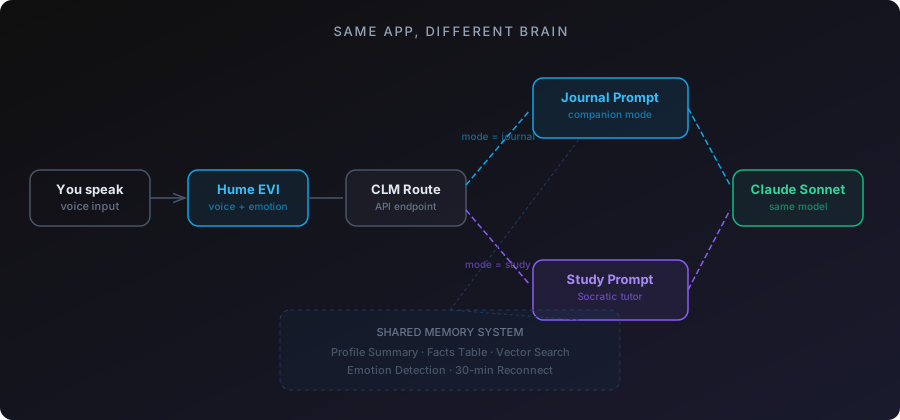
Study mode isn't a separate product. It's the same app, same voice pipeline, same memory system, same database. Just a different purpose.
In journal mode, the AI is your companion. It listens, remembers, responds with emotional awareness. In study mode, it's your tutor. It teaches, quizzes, pushes back, and won't move on until you get it right.
The switch is a toggle in the UI. Journal or Study. That toggle changes which prompt builder runs (buildJournalCompanionPrompt vs buildStudyPrompt), which changes the AI's entire personality. Same Claude Sonnet model underneath. Same Hume voice pipeline. Same TiDB queries. Different instructions.
This matters architecturally because I didn't have to build a second app. Every improvement to the voice pipeline, the memory system, the reconnection logic, the emotion detection, all of it benefits both modes. One codebase, two products.
Teaching an AI to Teach
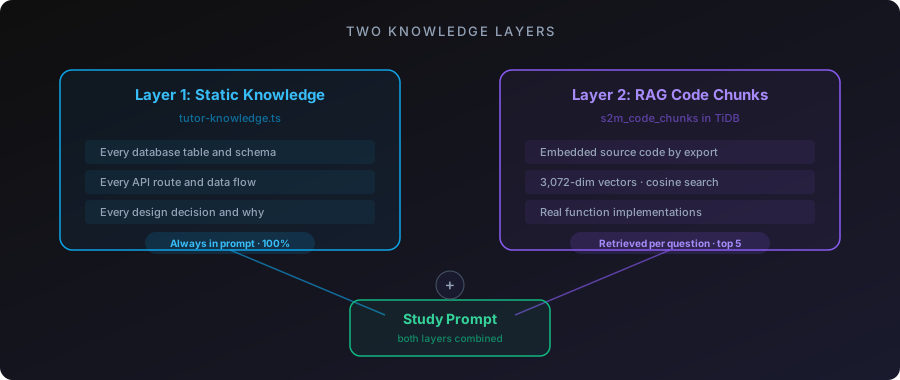
The tutor has two knowledge layers.
Layer one: static knowledge. A curated document in tutor-knowledge.ts that covers the complete system overview. Every database table, every API route, every data flow, every design decision. This gets included in the study prompt every time. It's always there. The tutor can always reference the full system architecture without relying on retrieval.
Layer two: RAG over the actual source code. I embedded every exported function from the codebase as vector chunks in TiDB, stored in a s2m_code_chunks table alongside the conversation chunks. Same embedding model (text-embedding-3-large), same 3,072 dimensions, same cosine distance search.
When I ask "how does storeFacts work?" the tutor doesn't guess. It retrieves the actual function from the embedded codebase and explains the real implementation. When I ask "what does the Inngest pipeline do after a session ends?" it pulls the actual step functions and walks through them.
The Socratic method is in the prompt. The tutor explains a concept, then asks "can you explain that back to me?" If I get it wrong, it re-teaches and asks again. If I get it right, it moves on. If I try to handwave through something with vague language, it calls me out.
// From buildStudyPrompt
// "When the user gives a vague or incomplete explanation,
//  ask them to be more specific. Do not accept 'it just works'
//  or 'it handles that automatically' as answers."
The AI won't let me fake understanding. That's the whole point.
The Fact Isolation Problem
Here's a bug that took me a while to catch.
The fact extraction pipeline runs after every conversation. Journal mode or study mode. It pulls out facts from the transcript and stores them in the facts table. Facts like "Wife's name is Glenda" or "Daughter born December 16, 2025."
Except study mode was generating facts like "Speak2Me uses three-tier memory" and "Vector search uses cosine distance at 0.5 threshold." Technical details about the codebase were getting mixed into my personal profile.
Out of 339 active facts, 56 were study-mode noise. The profile summary was bloated with architecture details sitting next to family information. And since the profile caps at 6K characters in the prompt, the AI was only seeing the first chunk, which was mostly miscategorized technical junk.
The fix was a mode column on the facts table. Defaults to "journal". Study conversations tag their facts as "study". Every read path in the system, the CLM route, the profile endpoint, the cache builder, buildProfileFromFacts, now filters to journal-only.
-- Before: all facts, including study noise
SELECT * FROM s2m_user_facts WHERE user_id = ? AND is_active = true

-- After: only journal facts touch the personal profile
SELECT * FROM s2m_user_facts
WHERE user_id = ? AND is_active = true AND mode = 'journal'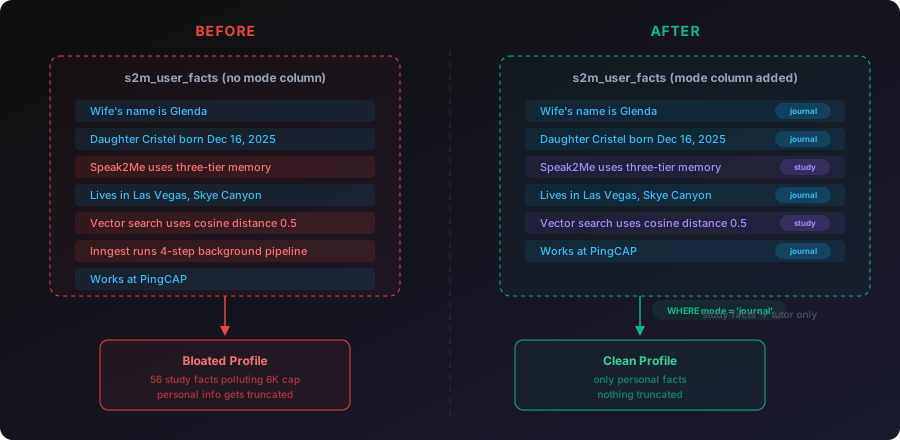
Study facts still get stored. They're useful for the tutor to reference across sessions. But they never pollute the personal profile or the journal prompt. Two separate knowledge spaces in one table, separated by a single column.
I also added per-category caps at this point: 15 most recent facts per category, 20 for identity and family. Without caps, a daily user for a year would accumulate thousands of facts and the profile would grow forever. The caps keep it bounded.
And a transcript quality guard: if a session has fewer than 3 user messages or under 200 characters total, skip fact extraction entirely. No more garbage facts from sessions where someone said "hey" and "bye."
Custom Study Topics
Study mode isn't locked to the Speak2Me codebase. There's a BlockNote editor (Notion-style block editor) where you can create custom study topics and paste any content you want.
Conference talk script? Paste it in. The AI becomes a talk coach that quizzes you on each section and flags when you skip critical beats.
Technical documentation for a product you're learning? Paste it in. The AI becomes a study partner that teaches the concepts through conversation.
Study notes for a certification? Same thing. The AI adapts its personality based on the content you give it. Same voice pipeline, same Socratic method, same personal context from your journal profile. It knows how you learn because it's the same memory system underneath.
The content from custom topics gets included in the study prompt alongside the static knowledge. The tutor treats it as authoritative material and teaches from it.
I used this to prep for a conference talk. I pasted my full talk script into a custom study topic and practiced through voice. The tutor quizzed me on each beat, caught when I skipped sections, and let me practice delivery over and over. I went from stumbling through the material to explaining the entire system, end to end, voice pipeline, memory architecture, agent loop, all of it, cleanly in under 60 seconds per section.
Couldn't have done that by reading the script. Not even close. The repetition through voice, getting quizzed, being forced to articulate each concept in my own words, that's what made it click.
88 Minutes Straight
A friend of mine is a software engineer with about 10 years of experience. He's making a career move into a space he's completely new to. New domain, new product category, new technical vocabulary. He needed to understand a company's product deeply enough to explain it in an interview setting.
I gave him unlimited access to Speak2Me. He pasted the company's documentation into a custom study topic and started a voice session.
He used it for 88 minutes straight on the first day.
What he told me afterward: the app helped calm him down. He'd been anxious about not understanding the product well enough, and having a voice tutor patiently walk him through concepts and quiz him over and over reduced that anxiety. When he stumbled on an explanation, the AI caught it and re-taught the concept. When he got something right, it moved on. No judgment. No impatience. Just steady, adaptive teaching.
He passed the hiring manager interview. Moved on in the process. He told me it was because Speak2Me helped him understand the product well enough to explain it clearly and confidently.
He's still using it.
That 88-minute session was the first time someone other than me validated that study mode actually works. Not as a demo. Not as a concept. As a tool someone used to learn something real and then proved they learned it in a high-stakes situation.
The Meta Moment
Here's the thing that still gets me.
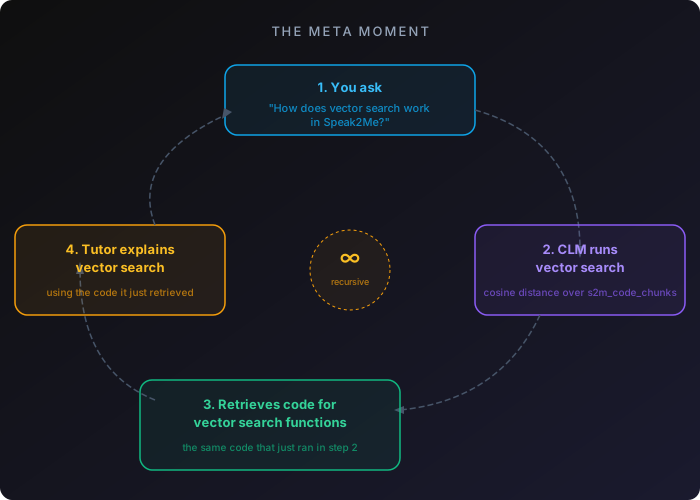
When I'm in study mode asking "how does vector search work in Speak2Me?" the CLM endpoint is literally running vector search on my question to retrieve the relevant code chunks from TiDB. The tutor is using the exact system it's teaching me about.
The three-tier memory system assembles context for the tutor the same way it assembles context for journal mode. Profile summary tells the tutor who I am. Facts table tracks what I've studied across sessions. Vector search finds the relevant code chunks for whatever I'm asking about.
The feature explains itself while executing itself.
The Tutor's Bugs
The tutor wasn't good at first. Three specific problems showed up during real usage.
It wouldn't shut up during practice. When I was rehearsing my conference talk and stumbled on a line (normal when rehearsing), the tutor would jump in with "Okay, yeah. You're adding that part." It should have recognized I was mid-attempt and stayed quiet until I finished or explicitly asked for help.
It over-corrected against scripts. During talk practice, I'd find my natural delivery. Say the same point with different words than the script. The tutor would flag it as wrong. But the script is a guide, not a teleprompter. Different words that deliver the same beat are fine. Only missing a critical beat entirely is worth correcting.
"Okay, yeah" was its verbal crutch. Almost every response started with "Okay, yeah." Hearing that 30 times in one session is maddening.
All three fixes were prompt engineering, not code changes. I added <talk_practice_rules> to buildStudyPrompt that tell the tutor: stay silent while the user is speaking, don't police exact wording, only flag skipped beats, and never start a response with "Okay, yeah."
<talk_practice_rules>
When the user is practicing a talk or speech:
1. STAY SILENT while they are speaking. Do not interrupt.
   Stumbling and restarting is NORMAL rehearsal behavior.
2. DO NOT police exact wording. The script is a guide.
   Only flag if they skip an entire beat or miss a
   critical moment.
3. When you give feedback, be specific. Say "you skipped
   the Pinecone line" not "you added extra context."
4. Never start a response with "Okay, yeah." Never.
</talk_practice_rules>
The tutor also had accuracy problems. It would explain the sequencing of the voice pipeline incorrectly, saying things happened "before you speak" when they actually happen "after you speak." I had to correct my own tutor multiple times on my own architecture.
The root cause: the tutor was assembling information from RAG chunks and getting the flow order wrong. The static tutor-knowledge.ts doc needed the exact sequencing spelled out explicitly so the tutor couldn't reconstruct it incorrectly from partial code chunks.
Lesson: a Socratic tutor that confidently teaches wrong information is worse than no tutor at all. The static knowledge layer needs to be comprehensive enough that the tutor never has to guess at sequencing or relationships between components.
Flat Facts Want to Be a Graph
After three months, the facts table had hundreds of entries across multiple users. Flat rows. Each one a string: "Wife Glenda's birthday is May 5." "Daughter Cristel was born December 16, 2025." "Works at PingCAP." "Lives in Las Vegas, Skye Canyon area."
These facts have obvious relationships. Glenda is a spouse. Cristel is a daughter. PingCAP is an employer. Las Vegas is a location. But in a flat table, those relationships are invisible. The only structure is the category column, and that's just a label, not a connection.
I built an entity extraction pipeline that turns flat facts into a knowledge graph in Neo4j. Claude Haiku parses facts into typed nodes (Person, Place, Experience, Topic) with properties, and typed relationships (SPOUSE_OF, LIVES_IN, WORKS_AT, CHILD_OF) connecting them.
The pipeline runs as a new Inngest step after store-facts. Non-blocking. If Neo4j is down, the rest of the pipeline still runs. TiDB stays the source of truth. Neo4j is a derived view.
A backfill across all existing data populated 669 nodes and 1,142 relationships.
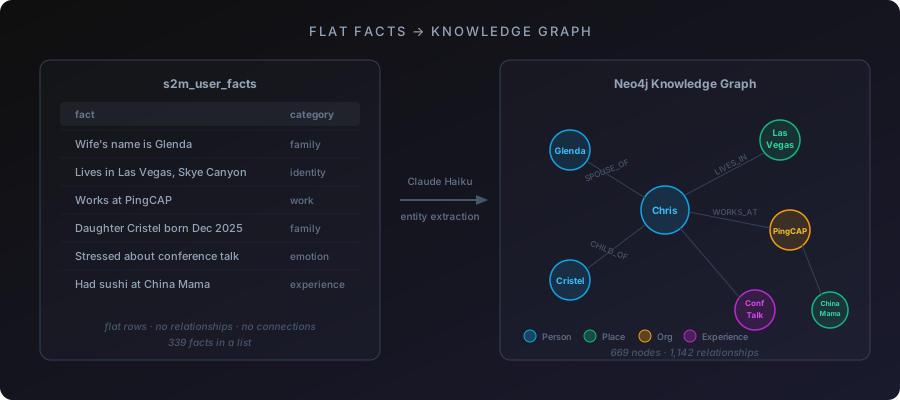
Running it exposed real problems. 460 facts in one Haiku call truncated the JSON response mid-object. Fixed by batching to 80 facts per call. Haiku sometimes returns non-string property values, crashing v.replace(). Fixed with String(v). Undefined to fields on relationships cause Neo4j's driver to silently create broken edges. Fixed with validation before writes. Large statement batches timeout in a single transaction. Fixed by chunking to 50 statements.
The 3D visualization renders these relationships as a force-directed graph using react-force-graph-3d and Three.js. People are blue. Places are green. Emotions are warm orange. Experiences are purple. Topics are teal. Node size scales by connection count.
Where this connects to study mode: I'm building two separate graph views. One for journal mode (your life relationships) and one for study mode (the relationships between concepts you've studied). Click a node and it surfaces the top 10 transcripts connected to that entity. Not unlimited transcripts. Just the most relevant.
Looking at your own knowledge as a graph is a different experience than scrolling a list of facts. You see which concepts connect to which other concepts. You see gaps. You see clusters of understanding and isolated nodes that need more work. The graph doesn't just store what you've learned. It shows you the shape of your learning.
What Study Mode Actually Is
It's not a flashcard app. It's not a chatbot with a study prompt. It's the Feynman technique with a voice interface, backed by RAG over real source material, persistent memory across sessions, and an AI that won't let you move on until you can explain the concept in your own words.
The technical stack: Hume EVI for voice (WebSocket, emotion detection, TTS), Claude Sonnet for reasoning, TiDB for memory (profile, facts, vector search, code chunks all in one database), Inngest for background processing, Neo4j for knowledge graphs, BlockNote for custom topic editing.
But the stack isn't the point. The point is: if you can't explain something out loud, you don't know it yet. And now there's a tool that holds you to that standard.
Speak2Me is live. First-time users get 30 minutes free on either journal or study mode. If you're learning something new, paste the material into a custom study topic and talk through it. If you're prepping for a talk, paste the script and practice out loud. If you're trying to understand your own codebase, embed the source files and let the tutor quiz you.
The rubber duck talks back now.
Questions about this post? Ask the terminal on my homepage — it knows this whole site.
